Calling
One click from the chat.
Hit Call in the conversation and the phone dials the customer. You can also dial from the keypad or from your contacts.

Coventia Phone is the virtual phone system of Coventia WhatsApp: landline numbers across Spain, voice menu, call recording and calls from your browser, in the same record where your team handles each customer's WhatsApp and email. It runs on top of your licence, with no hardware and no lock-in.
Already using Coventia WhatsApp? Turn it on from Settings › Channels in your account.
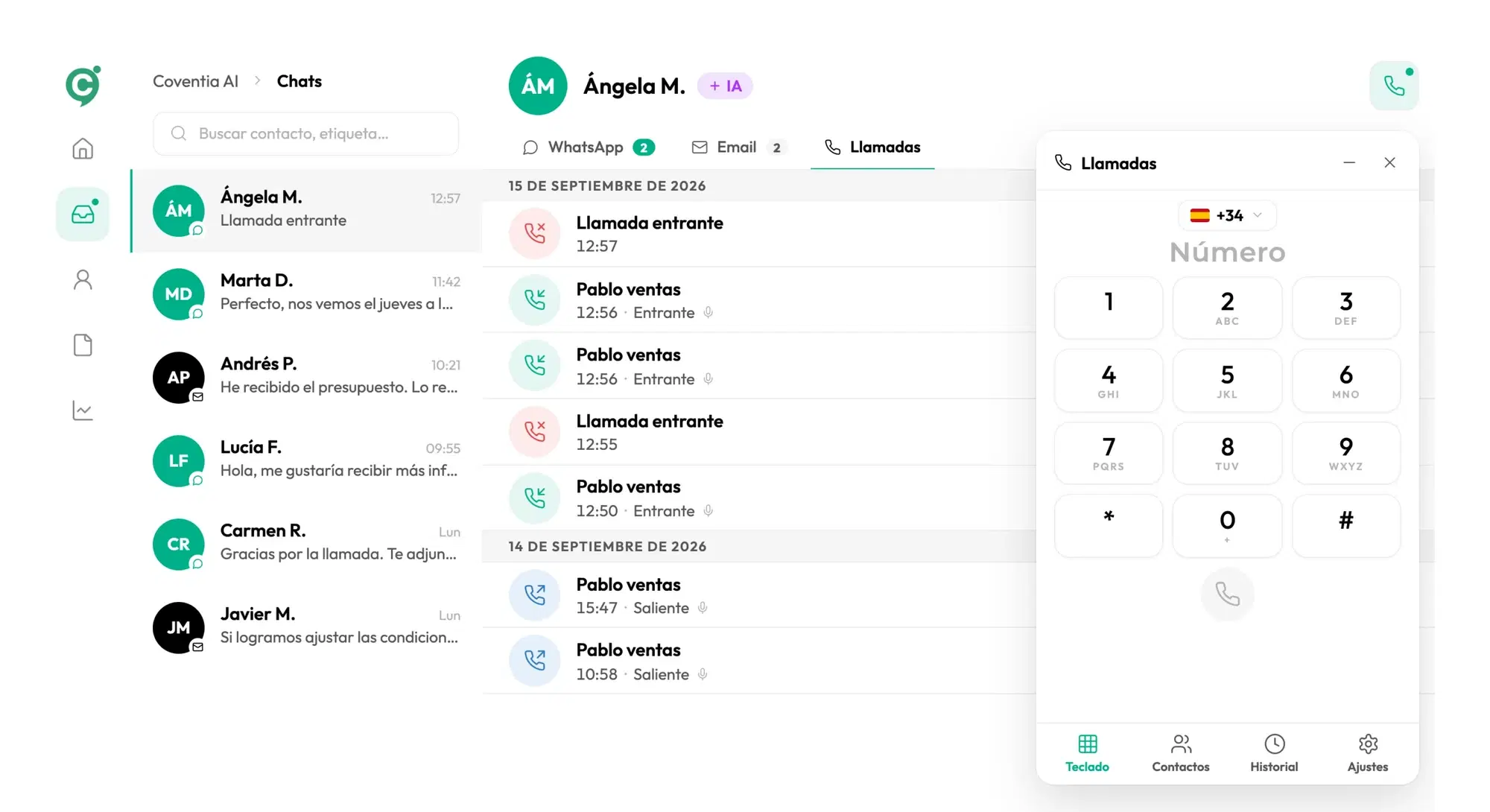
Call, answer and check the history without leaving the customer's record.
Hit Call in the conversation and the phone dials the customer. You can also dial from the keypad or from your contacts.
If the customer is in your contacts, you see their name as it rings and you can open their WhatsApp and email while you talk.
The Calls tab in every conversation keeps who took it, how long it lasted, the outcome and the recording, if there is one.
No hardware, no engineers and no maintenance contract. You set it up from your browser.
Build the menu on a canvas with your own recordings and send each key to a person or a group: all at once, in order, in rotation, to the least busy or at random.
Pick whichever area code you want or port your landlines from any operator. Your customers always see the company number, never a rep's mobile.
Move it and minimise it while you handle chats. Mute, hold or transfer without hanging up, in Chrome, Edge or Firefox.
Outside hours, the message you choose plays, using the same hours as your AI assistant on WhatsApp.
Every agent has their own internal line and you decide which ones are recorded. If someone leaves the company, their calls and their history stay.
Who took it, which route it came through and which number the customer dialled, with filters by person. Missed calls show in red so somebody rings back.
Recorded calls arrive with their transcript and a summary of the key points and next steps. Each point takes you to the exact moment in the audio, and the summary copies with one click.
All three route calls. What changes is where your team works and where each conversation ends up.
| What we compare | On-premise systemHardware in your office | Cloud phone systemContracted separately | Coventia PhoneThe phone system inside Coventia WhatsApp |
|---|---|---|---|
| Installation | Hardware and an engineer in the office | None | None: it runs in the browser |
| Call history | Basic log on the device | In the provider's dashboard | In the customer's record |
| WhatsApp and email | Separate | Separate, unless integrated | In the same conversation as the calls |
| Outside hours | Recorded message | Recorded message | A message on the call and an AI assistant on WhatsApp |
| Changes to menus, groups and hours | Through the engineer | From the provider's dashboard | From the same platform where you work |
| How you pay | Purchase or leasing, plus maintenance | The provider's subscription | Your Coventia WhatsApp licence plus the Phone plan, with no lock-in |
| Book a demo | |||
If you don't deal with customers over WhatsApp. A separate cloud phone system may work out cheaper. Coventia Phone makes sense once WhatsApp is already an important channel.
If you need mobile numbers. Today we only work with landlines.
If your team needs a desktop app. Coventia Phone runs in the browser.
If you already have a cloud phone system and don't want to switch. Some of the most widely used ones can be connected to Coventia WhatsApp to call with one click from each chat.
Ring a lead back with their WhatsApp conversation in front of you, and from the company number, not your own.
Share calls out across the team, let callers hear their place in the queue and make sure no missed call goes unanswered.
A number with each province's area code and its own menu for each one, all in the same account.
A menu for new policies and claims, with the claim call sitting next to the photos the customer already sent over WhatsApp.
AI for insurance brokersChoose Basic or Advanced, register your company details and verify your phone with an automated call.
Choose numbers with your area code or request the porting of your landline. Spanish regulations require identifying the holder: if you are a company, your tax ID (CIF) and a utility bill less than six months old; if you are self-employed, your tax registration certificate (certificado de situación censal) and your ID document.
We assign an extension to each agent and design the voice menu and the call groups with you. Your team opens the phone at the start of the day and can start calling.
Coventia Phone runs on top of the Coventia WhatsApp licence. If you don't have it yet, we start with the demo and setting up the platform.
A virtual phone system built into the same platform as your WhatsApp and your AI. Coventia Phone runs on top of the Coventia WhatsApp licence (€80/month + VAT). Prices exclude VAT.
Annual billing applies only to Coventia Phone. The Coventia WhatsApp licence is billed monthly.
Small teams that want their calls inside Coventia WhatsApp
€80 licence + €35 Coventia Phone
Teams with several departments and a higher call volume
€80 licence + €65 Coventia Phone
Plans with more numbers, minutes and users for large teams.
Because it isn't just another phone system: your calls live in the same customer record as your WhatsApp conversations and the AI's replies. One customer, one single story, with no jumping between tools.
A virtual phone system is cloud telephony that manages a company's numbers, extensions and calls with no hardware and no installation in the office. It does the same as an on-premise system, such as routing calls or offering a voice menu, but you set it up from your browser. Coventia Phone is the virtual phone system of Coventia WhatsApp.
No. Coventia Phone is an extension of Coventia WhatsApp and runs on top of its licence (€80/month + VAT). With the licence, plans with telephony start at €115/month + VAT, with no lock-in.
Yes. We port your landline from any operator and your customers keep calling the number they already know. You'll need a recent bill from your operator, and the process usually takes about 4 or 5 working days.
No. Coventia Phone runs in the browser (Chrome, Edge or Firefox) with a headset. To receive calls, each agent opens the phone at the start of the day and leaves it minimised.
Yes, and you decide on which extensions: for example, only on sales or on complaints. Recordings are played back from each call's history. Let your customers know the call may be recorded.
No. Coventia Phone works with landline numbers using the area code of whichever province you choose, and only landlines can be ported. You can call mobiles from them: the plans include minutes to EU mobiles.
In a 30-minute demo we look at how your calls would come in, which voice menu suits you and which plan you need.